Solo Creator, First Income in October 2026: Form 2210 and the Annualized Worksheet
This is education, not tax advice. I'm not a CPA or EA. State taxes are not covered.
The Form 2210 and Schedule AI read below are the 2025 editions — the latest posted as of 2026-10-07; the 2026 form and the 2026 Instructions for Form 2210 are not yet posted. Publication 505 (2026) is this article's 2026 source. If a line changes, this page is updated in place with a dated note at the foot of the article.
- Last checked
- Tax year
- 2026
- Core line
- Schedule AI, line 27 — annualized income installment; entered on Form 2210, Part III, line 10
- Changes
- Update log (1)
§1One job, one tax year, one line
One job, one tax year, one line. The job is solo creator. The year is 2026. The line is Schedule AI, line 27 — the annualized income installment, the figure that leaves this worksheet and enters Form 2210 at Part III, line 10.
The situation is printed in the calendar. This creator's channel earned nothing in January, and nothing through the summer; the first income of the year arrived in October. By then, three of the year's four estimated-tax due dates had already passed, each figured as if the year's income were spread evenly across it.
One status note before any line is read. The Form 2210 and Schedule AI in this article are the 2025 editions, the latest the IRS has posted; the 2026 form and its instructions are not out yet. Publication 505 for 2026 is this article's 2026 source.
§2The penalty is figured period by period
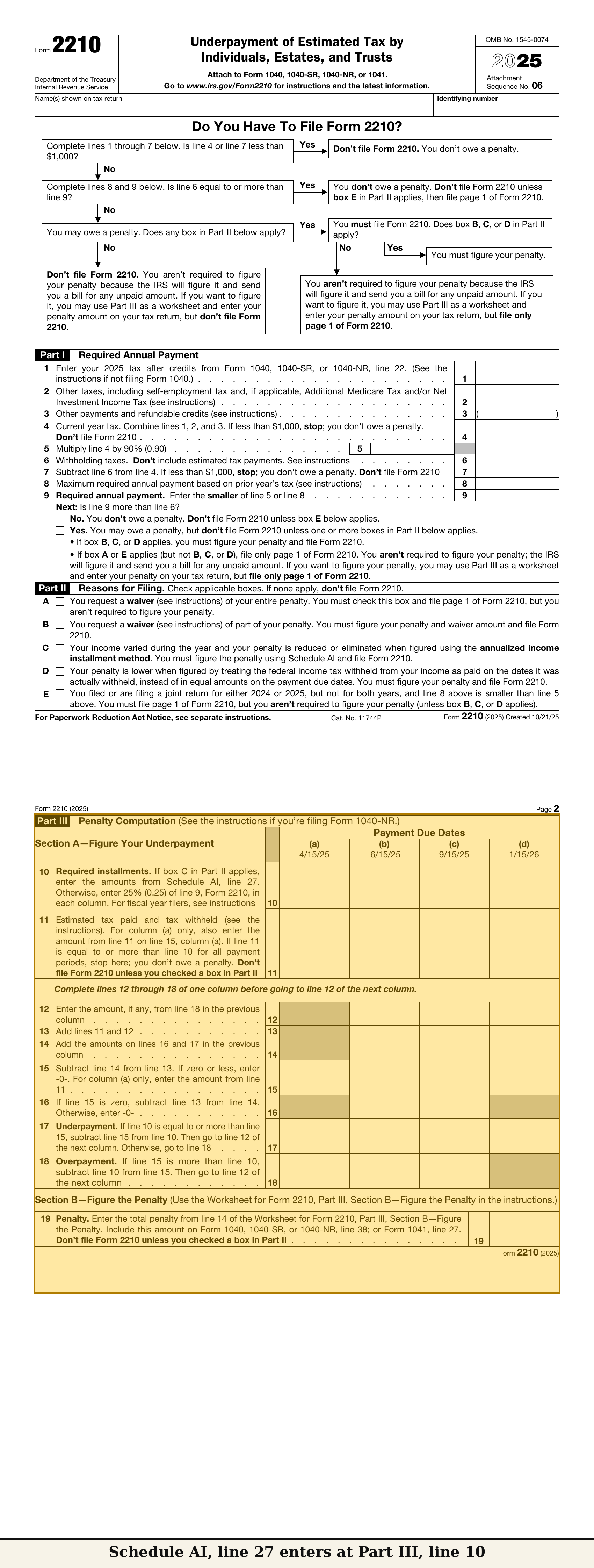
Start with how the underpayment penalty is figured.
The instructions for Form 2210 figure the penalty separately for each payment period — four periods, four separate computations. A payment made later in the year is applied where the form applies it; it does not reach back and erase an underpayment already figured for an earlier period. The regular installment method, from Article 1, divides the required annual payment into four equal installments, one per due date, whatever the income was doing in those months.
The annualized income installment method is the printed alternative for income that does not arrive evenly. Publication 505 for 2026 carries it as Worksheet 2-9 — completed after Worksheet 2-1, through line 14b — and the publication is plain about the paperwork: using the annualized method to figure payments means filing Form 2210 with the return. Instead of assuming each period held a quarter of the year, Schedule AI recomputes each period from the income actually received by that period's cutoff. That recomputation is the whole article.
§3Reading Schedule AI, Part I
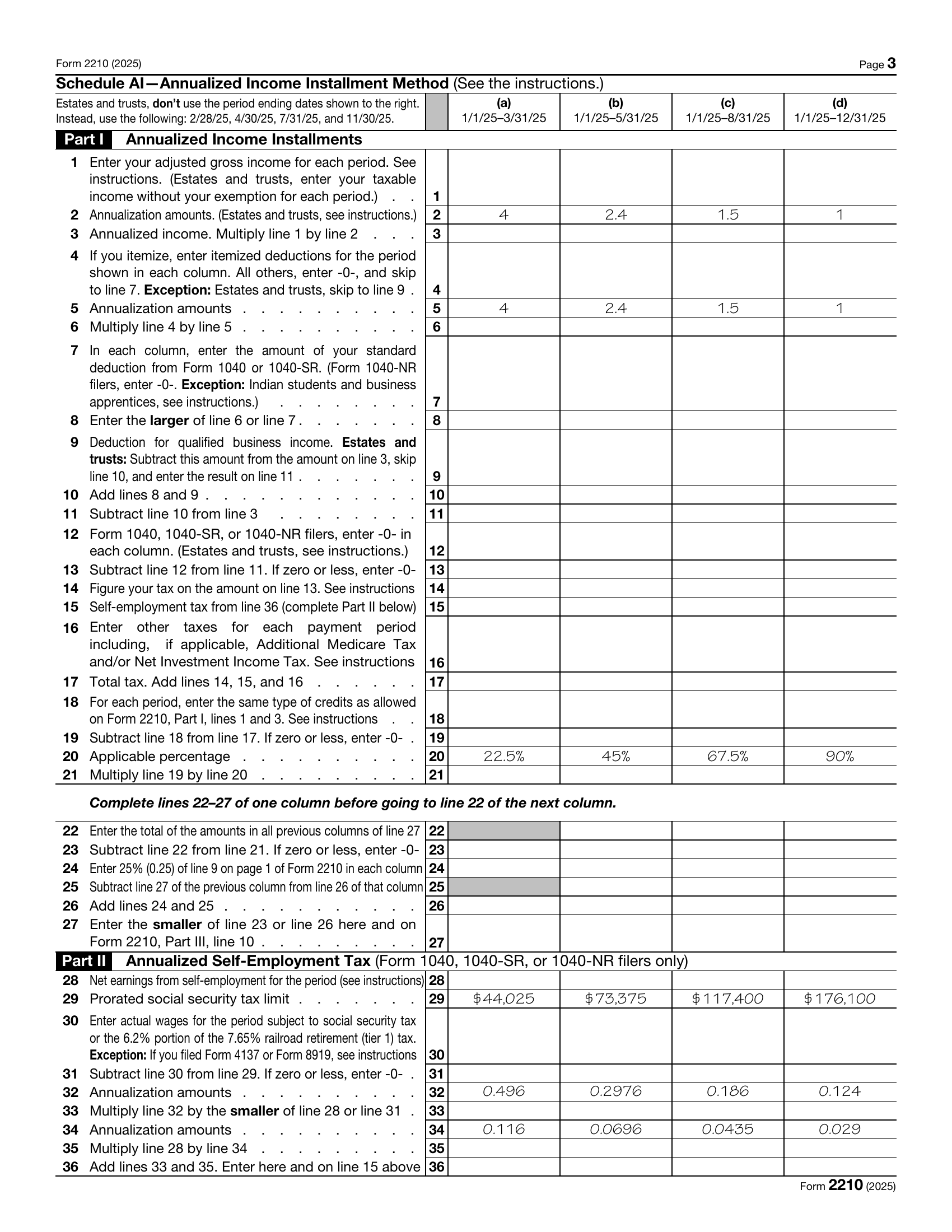
Schedule AI has four columns, and they are cumulative. Column (a) covers January 1 through March 31. Column (b) covers January 1 through May 31 — it contains column (a)'s months. Column (c) runs January 1 through August 31, and column (d) is the full year.
Line 1 enters adjusted gross income for the period. Lines 2 and 5 print the annualization amounts: 4, 2.4, 1.5, and 1. Line 3 is line 1 times line 2: annualized income. Lines 4 through 8 build the deduction: line 4 is the period's itemized deductions; line 6 multiplies line 4 by line 5's annualization amount; line 7 is the standard deduction; line 8 takes the larger of line 6 or line 7. Line 9 is the qualified business income deduction. Line 10 adds lines 8 and 9, and line 11 subtracts line 10 from line 3. Line 13 is the taxable income that build produces, and line 14 is the tax on line 13. Line 15 is where the self-employment tax enters, from Part II of this same schedule. Line 16 is other taxes. Line 17 totals lines 14 through 16. Line 18 is credits, and line 19 subtracts line 18 from line 17.
Then the installment build, lines 20 to 27. Line 20 prints each column's applicable percentage: 22.5 percent, 45 percent, 67.5 percent, 90 percent. Line 21 is line 19 times line 20. Line 22 enters the total of the amounts in all previous columns of line 27. Line 23 subtracts line 22 from line 21. Line 24 is the benchmark from the regular method: 25 percent of the required annual payment from Form 2210, Part I, line 9. Lines 25 and 26 carry that benchmark's running total, and line 27 takes the smaller of line 23 or line 26. Line 27, in all four columns, is entered on Form 2210, Part III, line 10, where the underpayment is figured to the penalty at line 19.
One rule governs the whole schedule: if Schedule AI is used for any due date, it is used for all due dates. Box C in Part II of Form 2210 is checked; Parts I through III are attached with the schedule. There is no column-picking.
§4Worked example, Part I: three zero columns
One worked example, with numbers used only in this article.
A solo creator — hypothetical, not a prediction, not your numbers — has no income at all from January through September 2026; the first income arrives in October, and across October through December the net profit is $30,000.
Run the columns. In column (a), line 1 is zero — no income by March 31. Line 3, annualized income, is zero times 4: zero. Line 19 is zero, line 21 is zero — 22.5 percent of zero — and line 23 is zero. Line 27 is the smaller of line 23 or line 26, and with line 23 at zero, line 27 is zero, whatever the regular-method benchmark on line 24 holds. Columns (b) and (c) read identically: no income by May 31, none by August 31, so line 1 is zero and every line built on it is zero, down to line 27.
Column (d) is where the year's income finally enters. Line 1 carries the full-year figure, and the column runs through the same lines — line 14 is the tax on the annualized taxable income — and line 15 receives the annualized self-employment tax from Part II: $4,238.87, computed line by line in the next section. Line 21 takes 90 percent of line 19. Line 22 enters the total of the amounts in all previous columns of line 27 — zero, zero, and zero here. Line 23 subtracts line 22 from line 21, and what reaches line 27 in column (d) is the year's single installment.
| Schedule AI line | Column (a) 1/1–3/31 | Column (b) 1/1–5/31 | Column (c) 1/1–8/31 | Column (d) 1/1–12/31 |
|---|---|---|---|---|
| 1 — AGI for the period | $0 | $0 | $0 | Full-year figure enters here (structure only) |
| 2 — Annualization amount | 4 | 2.4 | 1.5 | 1 |
| 3 — Annualized income (1 × 2) | $0 | $0 | $0 | — |
| 19 — Total taxes less credits | $0 | $0 | $0 | Includes line 15 (col. d): $4,238.87 |
| 20 — Applicable percentage | 22.5% | 45% | 67.5% | 90% |
| 21 — Line 19 × line 20 | $0 | $0 | $0 | 90% of line 19 (structure only) |
| 23 — Line 21 − line 22 (prior line 27s) | $0 | $0 | $0 | Line 21 − $0 |
| 27 — Required installment (smaller of line 23 or line 26) → Form 2210 Part III, line 10 | $0 (line 23 is the smaller) | $0 | $0 | The year's single installment (structure only) |
§5Worked example, Part II: annualizing the SE tax
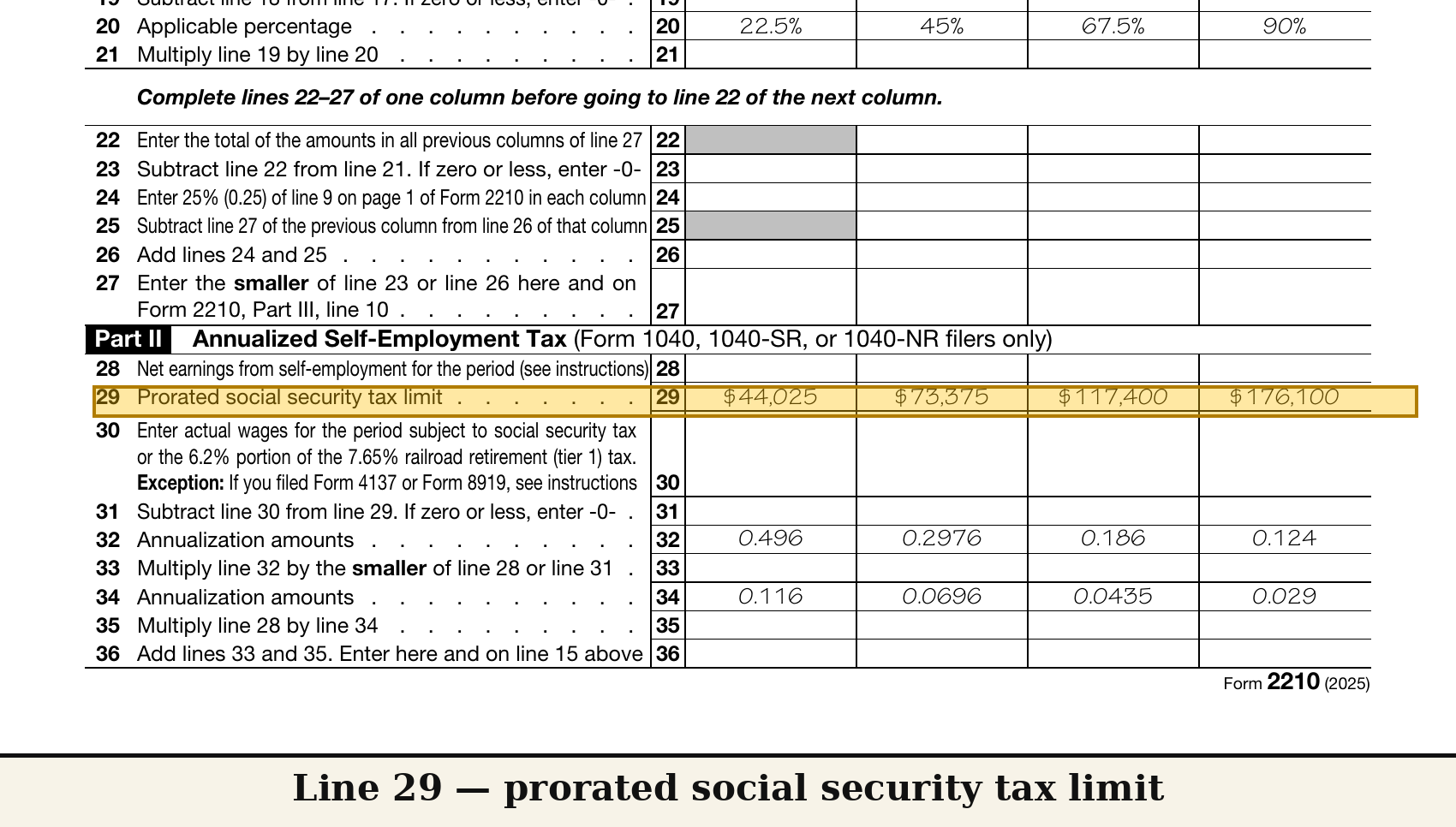
Part II of Schedule AI figures the annualized self-employment tax that feeds line 15.
Line 28 is the period's net earnings from self-employment, and the instructions give its build: the period's net profit times 92.35 percent. In columns (a), (b), and (c) there is no profit, so line 28 is zero and Part II produces zero — the same result the schedule prints for any period under the $400 line, where Part II is not required at all.
Column (d). Line 28 is $30,000 times 92.35 percent: $27,705. Line 29 is the prorated Social Security limit for the period — and here the reading stops at structure: the 2025 form prints dollar amounts on line 29 built from that year's wage base; the 2026 form is not posted, so no line 29 figure is read in this article. Line 30 is Social Security wages for the period; this creator has none, so line 30 is zero, and line 31 is line 29 minus zero. Line 32 prints the annualization amounts for the Social Security part: 0.496, 0.2976, 0.186, and 0.124 across the columns. Line 33 multiplies line 32's amount by the smaller of line 28 or line 31 — so watch the comparison before the multiplication. In column (d), line 31 is the full-year prorated limit from line 29 minus $0 of Social Security wages: a figure built from the wage base, far above line 28's $27,705. Line 28 is the smaller figure, so line 33 in column (d) is $27,705 times 0.124 — $3,435.42. Line 34 prints the Medicare-part amounts — 0.116, 0.0696, 0.0435, 0.029 — and line 35 multiplies line 28 by line 34's amount, with no limit line in between: $27,705 times 0.029 is $803.45. Line 36 adds them: $3,435.42 plus $803.45 is $4,238.87. That is the figure that enters line 15, column (d).
| Schedule AI line | Columns (a)–(c) | Column (d) | Operation |
|---|---|---|---|
| 28 — Net earnings from SE for the period | $0 (no profit in period) | $27,705 | Period net profit × 92.35% ($30,000 × 0.9235) |
| 29 — Prorated Social Security limit | — | Not read — 2026 form not posted; the 2025 form's printed amounts come from the 2025 wage base | Structure only |
| 30 — Social Security wages for the period | $0 | $0 | None in this example |
| 31 — Line 29 − line 30 | — | Line 29 − $0 | — |
| 33 — Social Security part | $0 | $3,435.42 | Line 32 amount (col. d: 0.124) × smaller of line 28 or line 31 ($27,705 × 0.124) |
| 35 — Medicare part | $0 | $803.45 | Line 28 × line 34 amount (col. d: 0.029) ($27,705 × 0.029) |
| 36 — Annualized SE tax → line 15 | $0 | $4,238.87 | $3,435.42 + $803.45 |
§6What the zeros do, and what they never promise
Read what the example actually shows, and what it does not.
It shows the mechanism. Because each column is recomputed from income received by its own cutoff, a year that starts in October produces a zero required installment in the first three columns of this worksheet.
It does not show a penalty being waived, forgiven, or promised away — and this site does not promise that. The penalty is figured period by period from the filer's own completed lines. A creator whose first income arrived in June would still show zero in columns (a) and (b) — column (b) ends May 31 — and the first nonzero column would be (c), January 1 through August 31; column (d) here carries a full installment built on the whole year's income. Schedule AI does not skip periods. It recounts them.
§7What this form does not cover
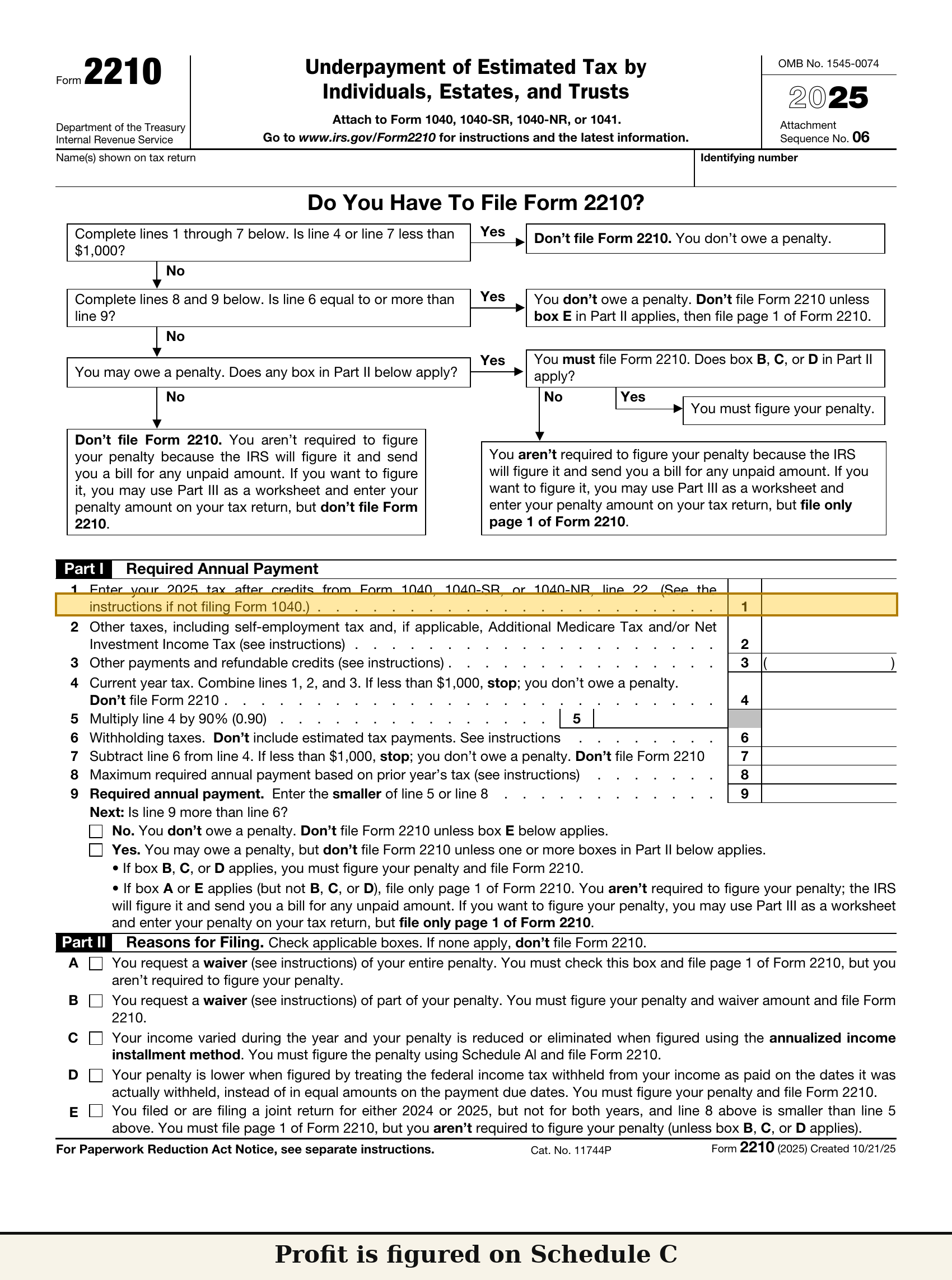
What Form 2210 and Schedule AI do not do, to close the reading.
They do not figure the income itself. The $30,000 of profit in the example was figured on Schedule C before this form begins. They do not figure the self-employment tax: Schedule SE does that, and Part II of Schedule AI annualizes the tax — it does not replace Schedule SE. They do not cover state estimated taxes — this site does not cover state taxes, in this article or any other. And they do not record when income arrived. The period split that every column stands on comes from the filer's own records and dates, which no line on this form can supply or check.
§8Software numbers vs ask-a-human numbers
The last step in this reading is the split this worksheet leaves behind.
One pile is arithmetic a piece of software can carry through Schedule AI on its own: the annualization multiplications on lines 3 and 6, the percentage multiplications on lines 21, 33, and 35, and the smaller-of comparisons on lines 27 and 33 — provided the period figures it is handed are the figures the form asks for.
Numbers and questions to take to a human before acting on them: the split of one year's profit into these cumulative periods, because every column is built on that split; a year that also contains W-2 wages, because the line 30 input changes Part II's arithmetic; and whether the annualized method is the method a particular filer's facts call for, among the methods the form and Publication 505 print.
That is Schedule AI, line 27, as the latest posted form prints it: four cumulative columns — zero in the three periods before this creator earned anything, and the year's installment built in column (d), entering Form 2210 at Part III, line 10. Form 2210 shown is the 2025 edition, the latest posted as of October 7, 2026.
Next article: this site's first full job form — a real estate agent's Schedule C for 2026, read from line 1 to line 31. Article 5
Sources
9 claimsEvery claim above traces to a document, a tax year, a line, and the date it was checked.
-
1
The underpayment penalty is figured separately for each payment period; a later payment does not erase an earlier period's underpayment
- DOC
- Instructions for Form 2210
- YEAR
- 2025 — latest posted at check date; 2026 instructions not yet posted
- LINE
- "Who Must Pay" / penalty figured separately per period
- CHECKED
- 2026-10-06
-
2
Form 2210 structure: Part I (lines 1–9) required annual payment → Part II reasons for filing (box C = annualized income installment method) → Part III figuring the underpayment (Schedule AI result at line 10; penalty at line 19, to the return's "Estimated tax penalty" line — line 38 on the 2026 draft Form 1040)
- DOC
- Form 2210; Schedule AI; Form 1040 (2026 draft)
- YEAR
- 2025 form; 2026 draft Form 1040
- LINE
- Form 2210 Parts I–III; Form 1040 line 38
- CHECKED
- 2026-10-06 / 2026-10-07
-
3
Schedule AI columns are cumulative: (a) Jan 1–Mar 31, (b) Jan 1–May 31, (c) Jan 1–Aug 31, (d) Jan 1–Dec 31; annualization amounts on lines 2 and 5 are 4, 2.4, 1.5, 1 (estates/trusts use different amounts — out of scope)
- DOC
- Schedule AI (Form 2210) form text
- YEAR
- 2025 form — latest posted at check date
- LINE
- Column headings; lines 2, 5
- CHECKED
- 2026-10-07
-
4
Part I flow: line 1 AGI per period → line 3 annualized income → lines 4–10 deductions and QBI → line 11 annualized taxable income → line 14 tax → line 15 annualized SE tax (from Part II, line 36) → lines 17–19 total taxes less credits
- DOC
- Schedule AI (Form 2210) form text
- YEAR
- 2025 form
- LINE
- Lines 1–19
- CHECKED
- 2026-10-07
-
5
Line 20 applicable percentages: 22.5% / 45% / 67.5% / 90%; line 21 = line 19 × line 20; line 22 = earlier columns' line 27 total; line 23 = line 21 − line 22; line 24 = 25% of Form 2210 Part I, line 9, in each column; line 25 = prior column's (line 26 − line 27); line 26 = line 24 + line 25; line 27 = smaller of line 23 or line 26, entered on Form 2210 Part III, line 10
- DOC
- Schedule AI (Form 2210) form text
- YEAR
- 2025 form
- LINE
- Lines 20–27
- CHECKED
- 2026-10-07
-
6
If Schedule AI is used for any due date, it must be used for all due dates; check box C in Form 2210 Part II; attach Parts I–III and Schedule AI
- DOC
- Instructions for Form 2210; Schedule AI instructions
- YEAR
- 2025
- LINE
- Schedule AI instructions; Form 2210 Part II, box C
- CHECKED
- 2026-10-06
-
7
Part II (annualized SE tax): line 28 = the period's net profit × 92.35%; if the period's SE income is under $400, Part II is not required / the amount is zero; line 29 = prorated Social Security limit; line 30 = Social Security wages for the period; line 31 = line 29 − line 30; line 32 amounts 0.496 / 0.2976 / 0.186 / 0.124; line 33 = line 32 × smaller of line 28 or line 31; line 34 amounts 0.116 / 0.0696 / 0.0435 / 0.029; line 35 = line 28 × line 34; line 36 = line 33 + line 35 → line 15
- DOC
- Schedule AI (Form 2210) form text; Instructions for Form 2210 (line 28 instruction)
- YEAR
- 2025 form / instructions
- LINE
- Part II, lines 28–36
- CHECKED
- 2026-10-07
-
8
The 2025 form's line 29 prints prorated amounts ($44,025 / $73,375 / $117,400 / $176,100) built from the 2025 wage base ($176,100) — deliberately NOT read as 2026 figures anywhere in this article
- DOC
- Schedule AI (Form 2210) form text
- YEAR
- 2025 form
- LINE
- Line 29
- CHECKED
- 2026-10-07
-
9
Annualized method on the Publication 505 track: complete Worksheet 2-1 through line 14b first, then the 2026 Annualized Estimated Tax Worksheet (Worksheet 2-9) and use its line 32 result; using the annualized method to figure payments requires filing Form 2210 with the 2026 return
- DOC
- Publication 505, Tax Withholding and Estimated Tax
- YEAR
- 2026
- LINE
- Worksheet 2-9 instructions (Annualized Income Installment Method)
- CHECKED
- 2026-10-06
Update log
Changes are dated and kept. Old figures are never silently overwritten.